Loading...
Official Software Hub · Developed by Rohit Tiger
Windowed Fullscreen
Full-window YouTube that doesn't hide your taskbar
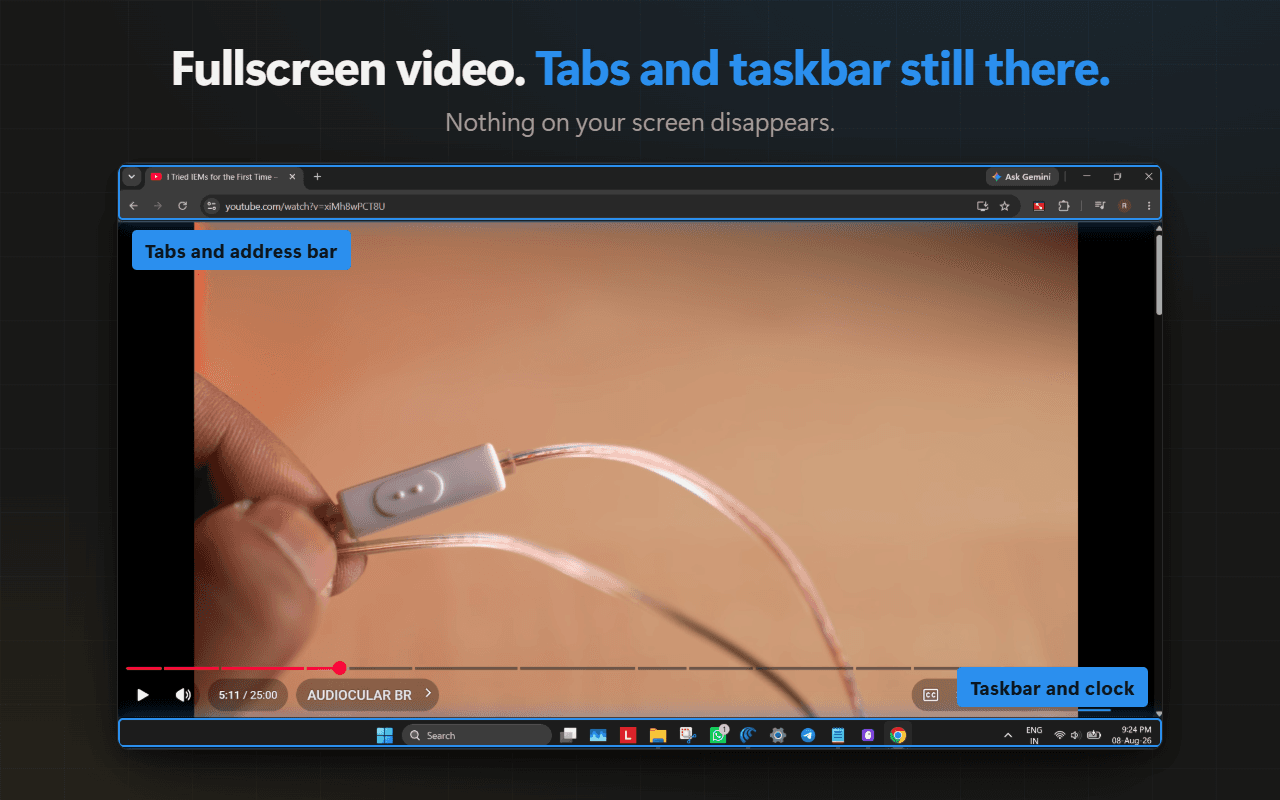
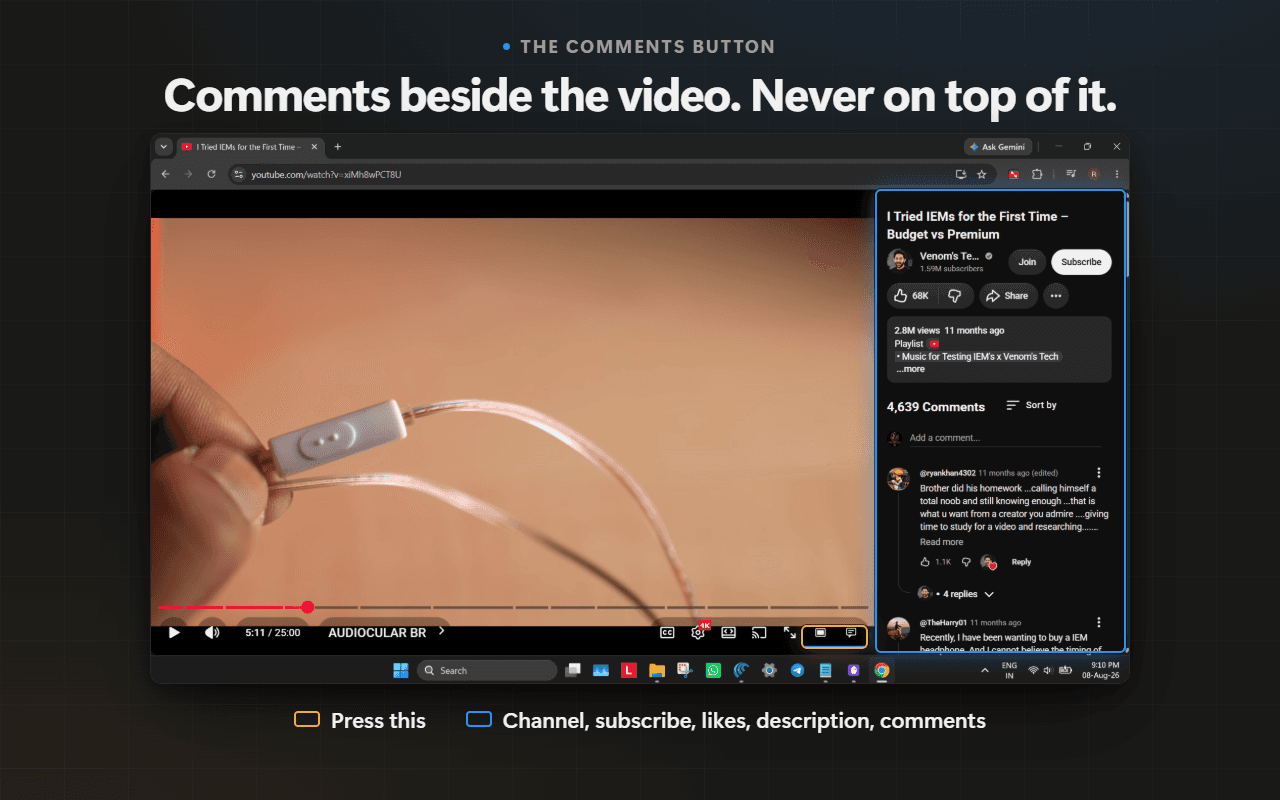
Native fullscreen takes over your whole display, so the moment you need a tab, a message, or the clock, you have to drop out of it. Windowed Fullscreen adds a second viewing mode right next to YouTube's own fullscreen button: the player fills your entire browser window, but the browser Fullscreen API is never called. Your tab strip, taskbar, clock, and notifications all stay exactly where they are. Six controls sit beside YouTube's fullscreen button, and three columns — comments, live chat, and the transcript — dock beside the video rather than covering it, each taking width from the player instead of sitting on top of it. The masthead slides back in whenever you move the cursor to the top edge. Pro adds resizable docks, the transcript column, frame capture at the video's own resolution, ambient glow, and custom letterbox themes.
INTERACTIVE SANDBOX
Try Windowed Fullscreen Live
Fully functional in-memory simulator. Test features in real-time right in your browser.
Windowed Fullscreen SandboxLive Interactive
PREVIEW & INTERFACE
Visual Showcase
CAPABILITIES
Engineered for Workflow Speed
Every capability is designed to enhance productivity without slowing down your browser.
Fills the window, not the display
The player expands to every edge of your browser window using CSS, never the browser's Fullscreen API.
Your taskbar stays put
Tab strip, address bar, clock, and notifications remain visible, so nothing interrupts you to get to them.
Three columns beside the video
Comments, live chat, and the transcript dock beside the player — each taking width from the video, never covering it.
Pop the video out, and back
One press floats the video above every window, and a second brings it home to whatever you were watching in.
Capture the frame you are watching
Save the current frame at the video's own resolution, with no interface in the picture, to your downloads or clipboard.
Resize the docks, light the bars
Drag any docked column to the width you want, and let the letterbox bars glow with the video's own colours.
PRICING & LICENSING
Simple & Fair Pricing
One-time purchase · No recurring subscriptions · 256-bit encrypted checkout via Dodo Payments.
Free
Free
Forever free
- Windowed fullscreen on YouTube — cover or scrollable, per site
- Comments and description docked beside the video
- Live chat docks beside the player on livestreams
- Picture-in-picture, in one click
- Copy the video link at the current timestamp
- Idle cursor auto-hide, and masthead reveal on hover
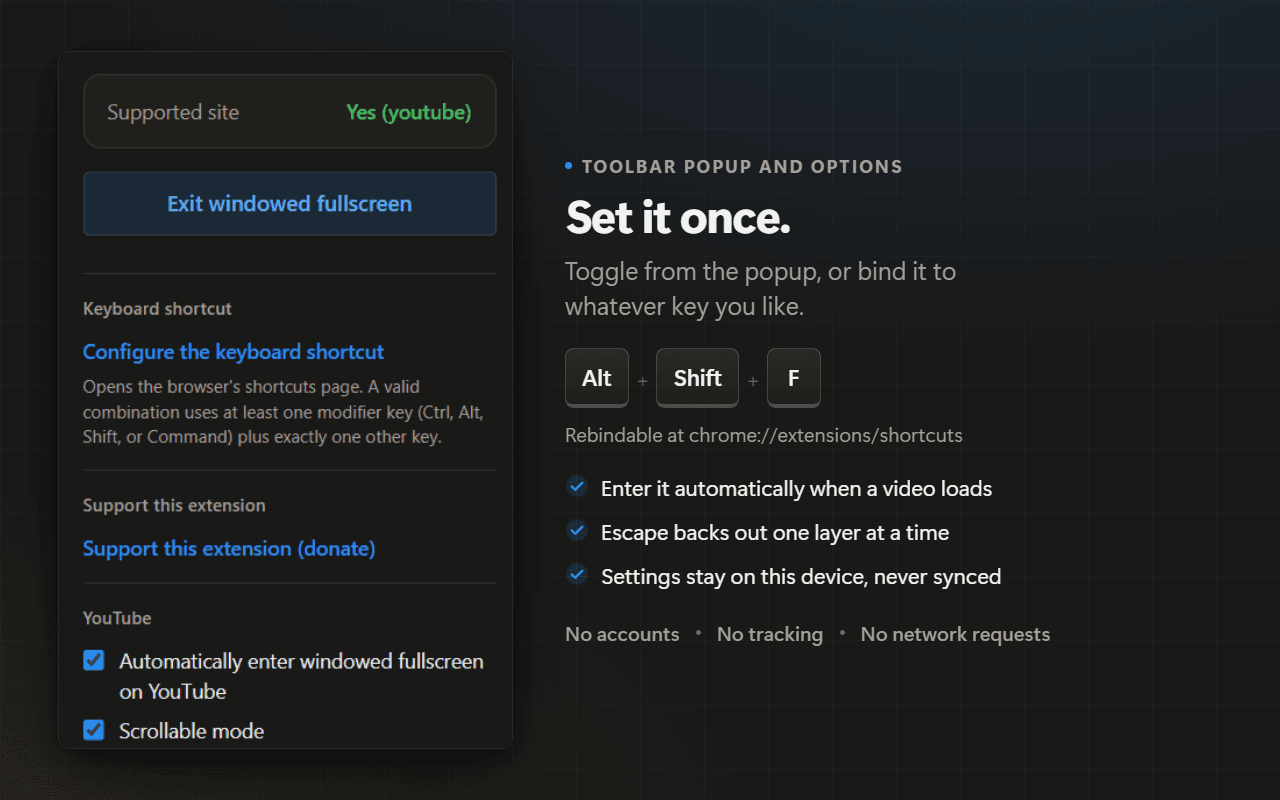
- Button, popup, Alt+Shift+F and Alt+Shift+D
- No account, no tracking, no ads
LIFETIME ACCESS
Pro
$10
One-time payment · Lifetime license
- Everything in Free — and everything free stays free
- Drag the comment, live chat, and transcript columns to any width
- Dock the interactive transcript in a column of its own
- Save the current frame at the video's own resolution
- Custom filename templates: {title}, {channel}, {date}, {time}
- Burn the playback time onto a saved frame
- Ambient glow: letterbox bars lit from the video's own colours
- Custom letterbox colour, 5 cinema swatches and 6 gradient themes
- One payment, lifetime licence — no renewal, no account
One-time purchase · No monthly fee
Instant license key delivery via email
Use across multiple browsers & devices
No account or login required
TRANSPARENCY & DATA SAFETY
Permissions & Data Practices
Every permission requested by Windowed Fullscreen is documented here with its exact technical reason.
Data collected: None for free use. If you buy Pro, the licence key you enter is stored on your device and sent to Dodo Payments — the payment provider that issued it — to confirm the purchase: once when you enter it, roughly once a fortnight after that, and once more if you remove it. That request carries the key and an id for this device's activation, which Dodo issues when you first enter the key so that one purchase can cover a limited number of devices. The activation id is not a fingerprint: it carries nothing about your machine, and the name this install registers under is a fixed string, identical on every install. Nothing else is ever sent: no account, no email, no page you were on, no video, no browsing history, and no settings. There is no server on our side, so there is nowhere for anything to be kept. Saving a frame is entirely local.
Data sent off device: Yes
Data shared with third parties: Yes
FAQ
Frequently Asked Questions
RELEASE HISTORY
What's changed
- Pro, $10 once: resizable docks, the transcript dock, frame capture, custom filename templates, burned timestamp, ambient glow, and custom letterbox palettes
- Live chat docks beside the player on a livestream, following YouTube's own chat toggle
- A picture-in-picture button — free, and an alternative to windowed mode rather than a layer on top of it
- Copy the video link at the current timestamp, from the player bar
- The suggestions rail is back in scrollable mode, beside the comments
- Idle cursor auto-hide, on by default and switchable per site
- Six controls in the player bar, up from two
- The settings moved into the toolbar popup; the separate options page is gone
- A close button on the docked comment panel, and Alt+Shift+D to toggle it
- The revealed masthead now ends where a dock begins, so it no longer covers a docked panel's own controls
- A refused license key now says which kind of refusal it was, so a key at its device limit no longer reads as a typo
- Performance: six causes of lag on every watch page fixed, and the injected script is 39% smaller
- Fixed: a protected video reports a blank frame instead of saving black; the transcript docks the moment you press it; saved frames always land on Windows
- One network request, and only with a license key: the key is verified with Dodo Payments. Without a key there are still none
- Removed: the options page, settings backup and restore, and the per-channel rules — favorite channels and channel memory — which could only ever read the previous video's channel
- Rebuilt settings, popup, and options UI
- A welcome page on install: thanks, one pin instruction, and four usage hints
- A rating row in the settings footer, and a prompt asked once in the extension's whole life
- A permanent feedback link, rather than one gated behind a low score
- A collapsed Tips section showing the keyboard combination the browser actually has registered
- Fixed the chapter title in the player bar doing nothing in windowed mode — it now hands the page back and opens YouTube's Chapters panel
- Fixed the rating prompt destroying itself on sight, and its controls overlapping in the popup
- Fixed synthetic resize events firing at a page the extension no longer owned after an in-app navigation
- Fixed restoring the player's inline layout undoing half of itself
- Comments button: docks the channel, subscribe, likes, description, and comments into a column beside the player
- Escape now backs out one layer at a time — side panel first, then the mode
- Fixed the side panel rendering as a solid black column on YouTube's light theme
- Fixed the revealed masthead painting behind the player, which made it impossible to click
- Smoother masthead reveal: quicker in than out, so drifting past the top edge no longer snaps it away
- Stopped YouTube's own top-right overlay from swallowing the hover at the top edge
- Fixed the chapter row wrapping its last segment onto a second line, which painted a stray red line under the scrubber
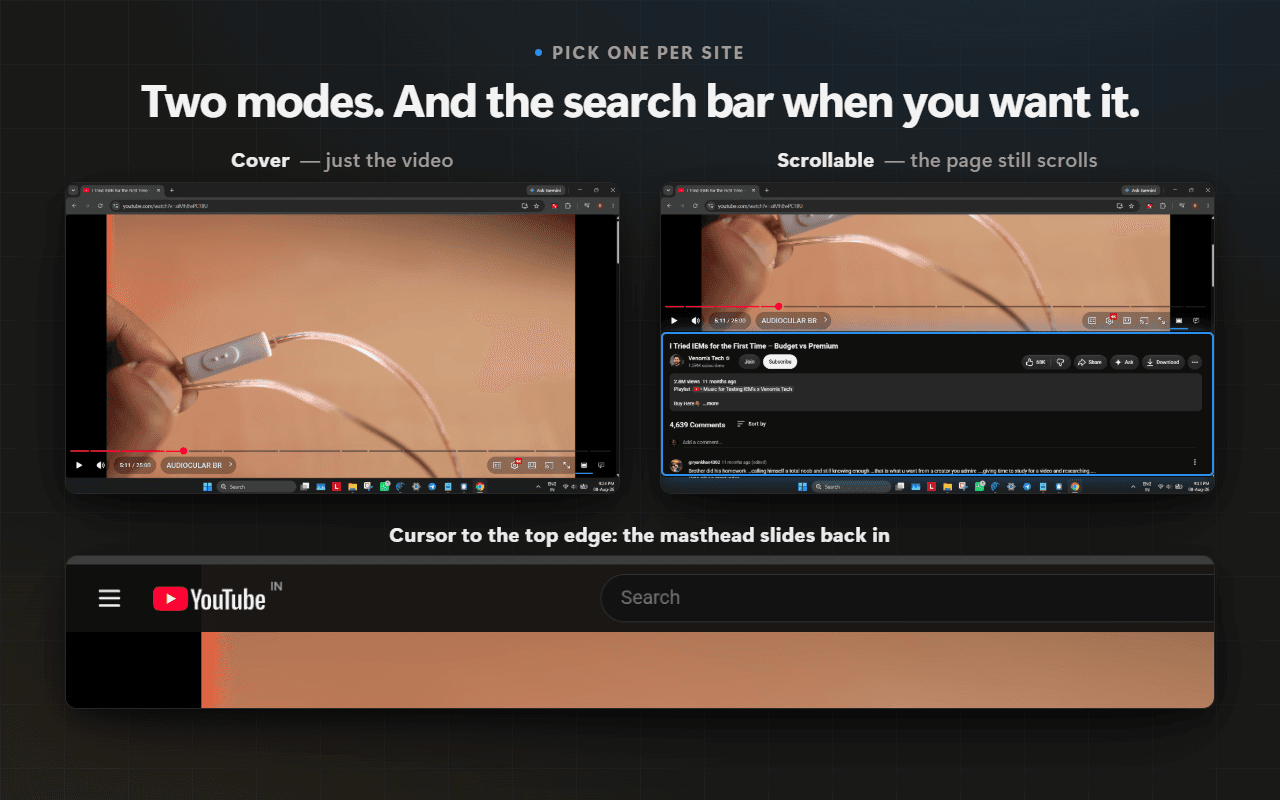
- Scrollable mode: the video still fills the screen on entry, but the page keeps scrolling to the description and comments
- The masthead is now hidden rather than removed — move the cursor to the top edge and the search bar slides back in
- Per-site mode setting in both the popup and the options page
- Initial release with YouTube support
- Windowed-fullscreen button beside YouTube's native fullscreen control
- Toolbar popup with status and one-click toggle
- Alt+Shift+F keyboard shortcut, rebindable
- Escape to exit, restoring the page exactly
- Optional per-site auto-apply
Official Windowed Fullscreen Software Landing
This is the verified landing page and official store for Windowed Fullscreen, developed by indie engineer Rohit Tiger. All license keys, downloads, and documentation are directly issued and supported.